Understanding RED Camera Formats & Camera Angles

In the Sketchup™ Camera Tools seminar this past weekend I talked about the current trend in digital cameras and how they relate in using camera lens angles to view 3D models and illustrations.
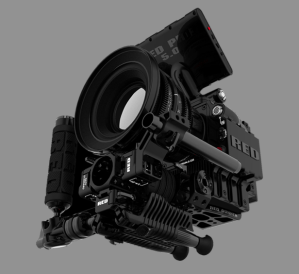
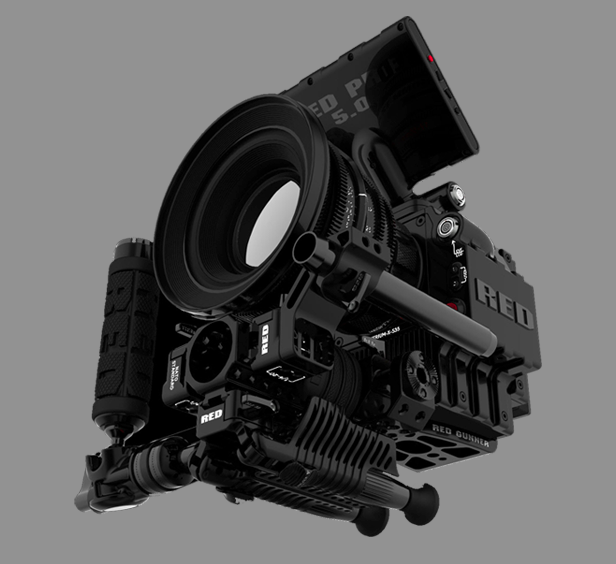
The RED Epic™

A camera that is creating a great deal of excitement in the camera world, and a lot of confusion in Art Departments, is the RED camera. Just over three years ago the Red Digital Cinema Camera Company  entered the market with what they called a DSMC system, or Digital Still and Motion camera system. The camera was basically a component system with the body, or brain, containing the sensor and the other various components needed to record an image. The system was designed to be configured and upgraded as the user saw best to fit their work needs. The design of a camera with dual capabilities would fuel the current trend of high-end still cameras which also record HD video, but that’s getting ahead of ourselves.

Designed with a 35mm sized chip, the camera is able to record video with the same depth of field as 35mm as well as having similar focal lengths, allowing for the use of existing lenses from other camera and 35mm systems.

The system allows the user to record in four different formats: 4.5k, 4k, 3k, and 2k and each of these can be framed or extracted in different aspect ratios. With the new Epic, whose sensor is 5k (5000 pixels across), the choices are 5k, 4.5k, 4k, 3k, 2k, 1080p, and 720p.

At this point your eyes are probably crossing and you’re saying, “so what?” Basically, what you need to know is that each successive format is a smaller cropped version of the previous one.
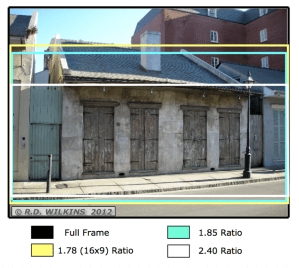
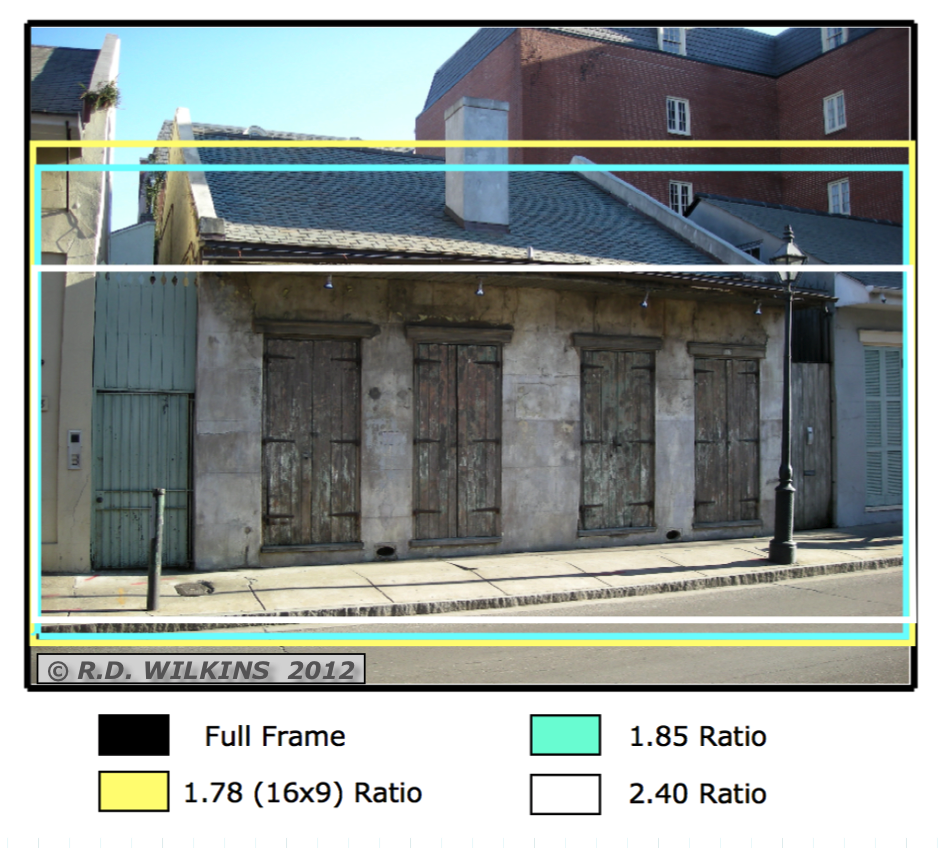
diagram showing a Super 35mm frame and the three extracted ratios

In Super 35mm, the frame, or negative is cropped according to the aspect ratio for the release. The difference is,  the cropping only occurs vertically. The width of all the formats is (nearly) the same, so that a lens focal length will be similar in each of them. Here is a diagram explaining the Super 35mm format from an article comparing digital and film formats that I wrote for theAug-Sept. 2010 issue of Perspective Magazine.

With RED, each format will have a narrower horizontal field of view than the previous one. Meaning that a 50mm lens in in 3k will have a much narrower field of view than it does shooting in full sensor 5k.

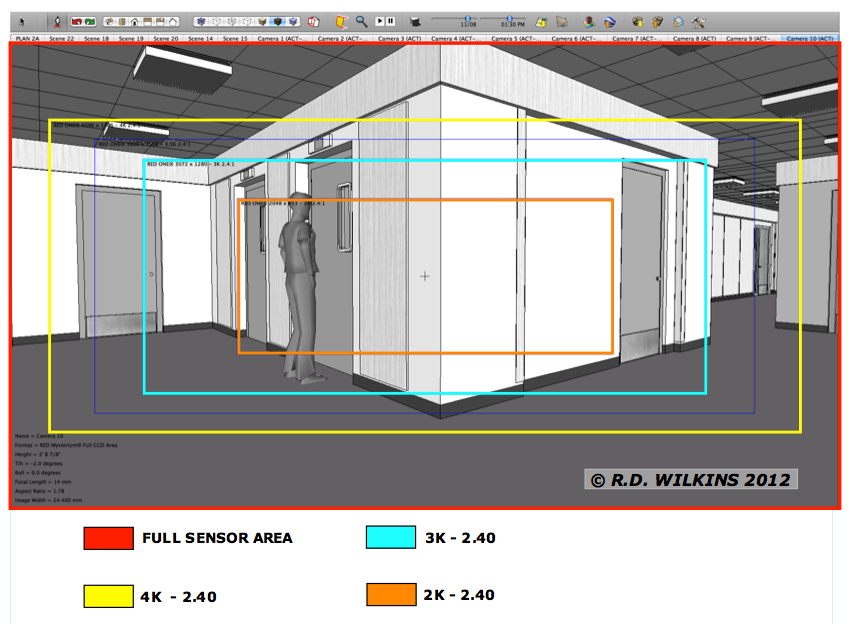
Below is a viewport in Sketchup™ set up using the Advanced Camera Tool pluging. The “camera” is set up for the full sensor option with the safe areas turned on for the other formats.
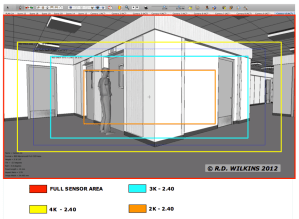
screen capture showing RED Camera full sensor area and 2K, 3K and 4K crop areas

In this screen shot of a model viewed with a 14mm lens, you can see how each progressively smaller ‘k’ format crops the sensor and has a narrower angle of view with the same lens. So, when you are setting up a model to view from a specific position with a particular lens, it’s important to know at what ‘k’ is the set going to be shot. Click on the image to enlarge it on your screen.
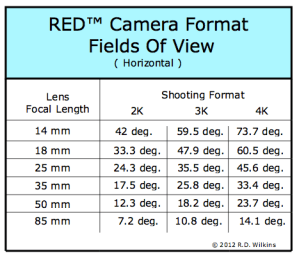
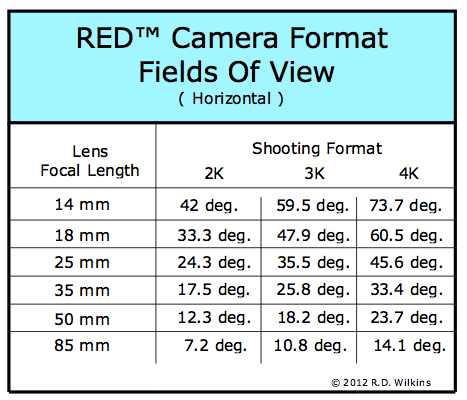
Chart of horizontal fields of view for various focal length lenses in the three different shooting formats

Here is a chart that breaks down the horizontal angle of views depending on which format the film is going to be shot in. The lenses listed are generic focal lengths and do not cover the entire range of lenses available. But, this should give you an idea of the proportional change in the horizontal angle of the captured frame based on the different shooting formats.
Camera Tools For Sketchup Pro

( Note: There is a half-day seminar on using the Camera Tool plugin on January 15 in Sherman Oaks. The cost is $50 but ADG members get in for $25. See the site below for more details: )

http://www.insidetheframe.biz

Years ago Sketchup developed a plugin for the industry called the Film & Stage plugin which allowed you to view a model with a set aspect ratio and allowed you to control the focal length of the viewing window.

The plugin was never updated for newer versions and was eventually put aside once the company was acquired by Google. Many of us have moaned for years, begging for an update. I devised a way of setting the view window to get a correct view with specific focal lengths, but it was a tedious process and a painful one to try to demonstrate to others.

In March Sketchup released a completely retooled version of the plugin that was everything I had hoped for and more. The new plugin, now called Advanced Camera Tools allows you to view your model with virtually any camera now available with any aspect ratio and with any focal length you choose. There is even a method of adding new cameras.

Nearly every camera in use in the industry is included with the pre-sets as well as all the RED cameras.

Aidan Chopra, product evangelist for Sketchup told me that updating the plugin really hadn’t been on the company’s radar until they held their semi-annual Basecamp last year in Boulder. The event was attended by Local 800 member Brad Rubin who pitched an update to them at that time. While it still didn’t make it onto their hotlist, the idea was intriguing to one of their software engineers, Brian Brown. The company offers to let their employees use 20% of their time working on side projects and Brian decided to use his time reworking the old Film & Stage plugin. So, we really have Brian and Brad to thank for making these tools available again.

While the plugin is as intuitive to use as Sketchup, there are things about the plugin that work differently when you are working inside it as opposed to the normal Sketchup tools.

The plugin is free, but works only with Sketchup Pro versions.

You can get it here:   http://sketchup.google.com/intl/en/download/plugins.html

With a little effort you can quickly save multiple camera views and know that they are fully editable without having to create entirely new views if the lens or camera information changes.

Sign Letter Visibility And Focal Length

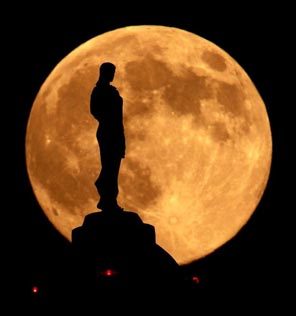
How big is the moon? Or, more to the point, how does the moon appear to change size so drastically? If you go outside at night and hold a ruler out at arms length, the moon will measure about 3/8″ in diameter. It will fit on the nail of your little finger.

Just as in the photos below, one silhouetting a hawk and the other an 8 foot statue, when shot with a camera it’s apparent size will vary according to the focal length of the lens it’s shot with.

photo by Charlie Riedel AP


Photo by Joseph Rodriguez AP

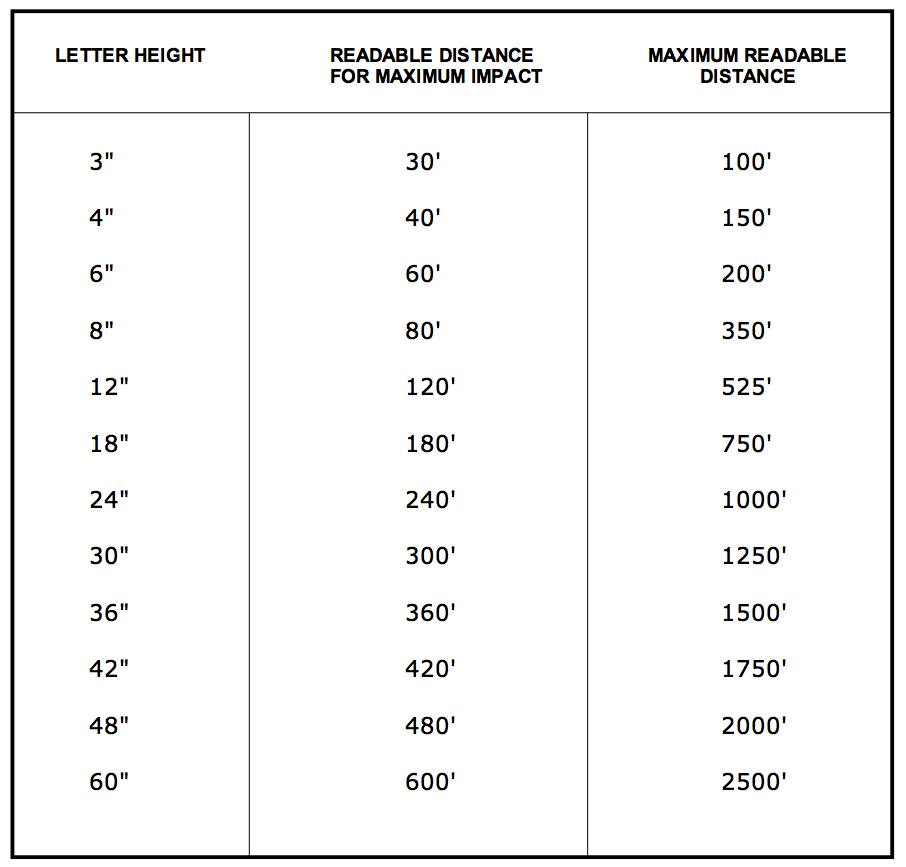
Take sign letters. An Art Director once gave me the chart below which is used to estimate the visibility of letters on signs, depending on the size of the letter and how far the viewer is standing away from it.  Obviously contrast plays a big part here, so this formula works best with red or black letters on a white background. Different colored letters or a darker background can reduce this distance by at least 10%.


These numbers, of course, only hold true when viewing them with the human eye. It’s obviously a different story if you’re shooting with a wide angle or long lens.

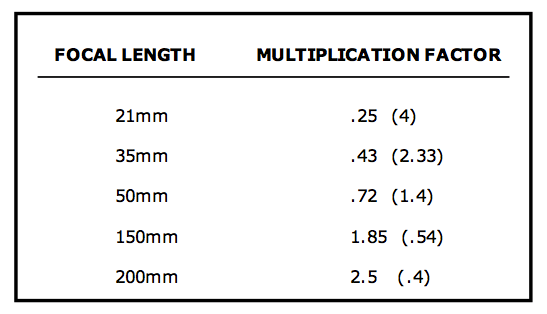
I’ve created a formula for applying the above data depending on the focal length of the lens being used. These focal lengths are equivalent to Super 35 or a 35mm size digital sensor.

To use the chart, just multiply the letter size by the multiplication factor. For instance, if you have a 24″ letter (or object) and shoot it with a 35mm lens, it will appear the same size as a 10.3″ letter would to the naked eye. The number in parenthesis is the division factor.

Please note these are rounded factors and the true result will vary according to the camera and sensor size as well as the lens. To convert the focal length of another sensor size, refer to the previous post on focal length conversion.


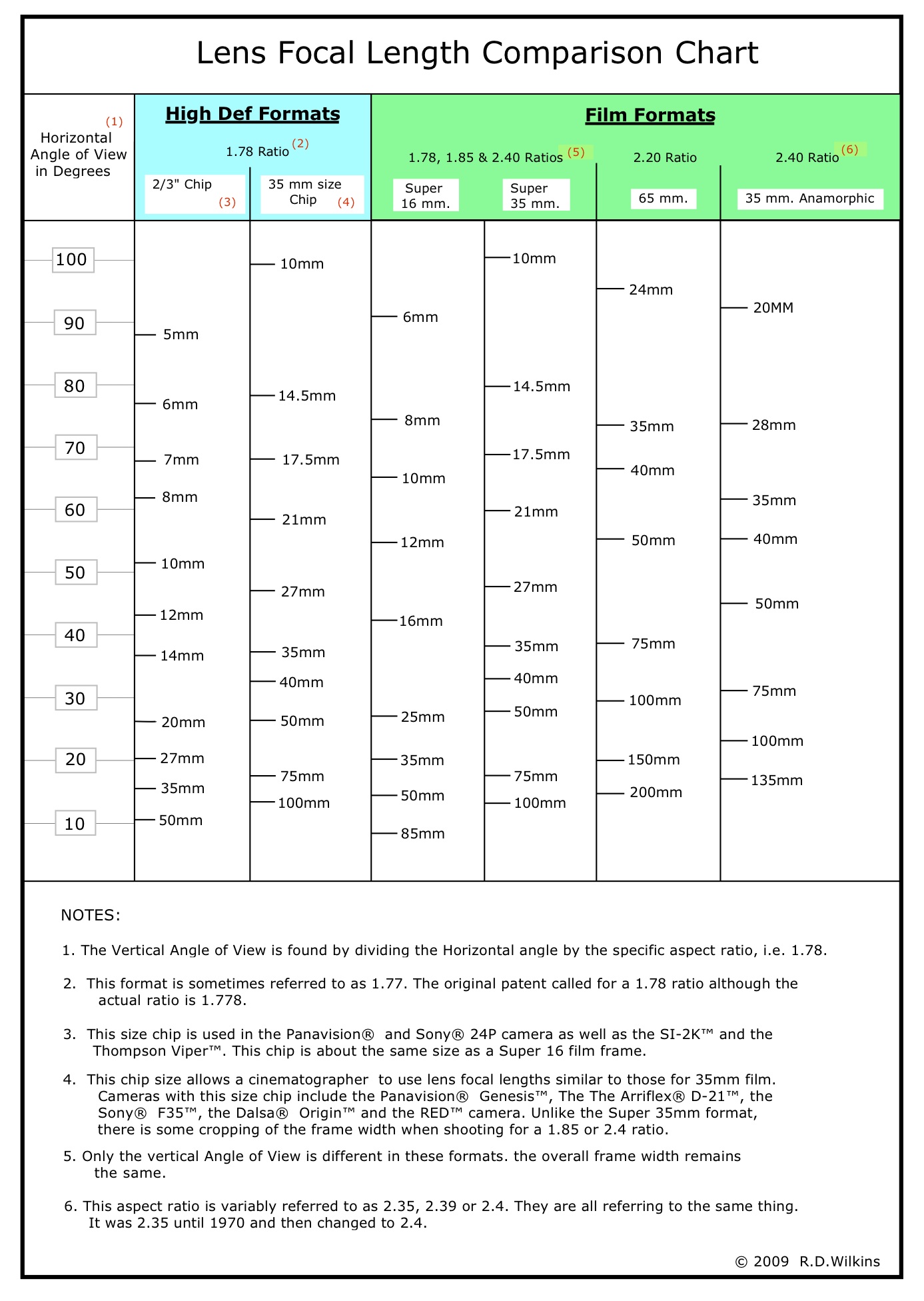
Lens Focal Length Comparison Chart

I created this chart last year for an article in September’s Perspective Magazine. Since then I’ve been asked for it several times and decided I should just post it where it’s easily accessible.

Using a straightedge, his chart will allow you to find the comparable focal lengths of lenses available in many of the popular digital sensor sizes as well as the typical film formats. You can download the PDF by clicking the link below.

Lens Focal Length Comparison Chart